CLI Quick Start
The Curviate CLI (curviate) gives you a terminal interface to the Curviate API, useful for scripting, exploring the API interactively, and building agent workflows without writing code. This guide covers installation, authentication, and the global flags available on every command.
Install
Node.js 18 or later is required.
# Install the CLI globally
npm install -g @curviate/cli
Verify the installation:
curviate --versionThe binary name is curviate. Source code is on GitHub at github.com/curviate/curviate-cli.
Authenticate
Interactive login (recommended)
# Launches a masked TTY prompt; the key is never echoed to stdout
curviate login
The login command saves your API key to the local config file. It performs no network call; the key is stored as-is and verified on the first real command you run.
Non-interactive login
In CI, a container, or any non-TTY context, set the key in the environment. This is the recommended non-interactive path: no config file is written, and the key never appears in ps output or shell history.
export CURVIATE_API_KEY="cvt_live_..."
curviate account list
The environment variable takes precedence over the stored profile, so it also works as a per-command override:
CURVIATE_API_KEY="cvt_live_..." curviate account listSecurity note:
curviate login --api-key cvt_live_...also works, but a key passed on the command line is visible to other processes viapsand is saved in shell history. PreferCURVIATE_API_KEYor the interactivecurviate loginprompt.
Find your API key
Your API key is available in the dashboard topbar settings chip. See Authentication & Accounts for the full setup walkthrough.
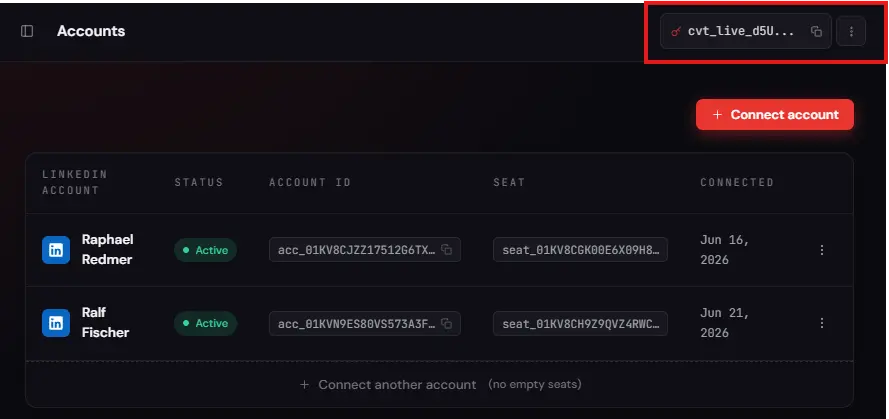
Manage profiles
The config subcommands let you manage multiple named profiles, useful when you work with several API keys or accounts.
# List all saved profiles (keys are redacted: prefix + last 4 chars only)
curviate config list

# Print the path to the config file
curviate config path

# Switch to a named profile
curviate config use <name>

# Rename a profile
curviate config rename <old> <new>

# Set the default account for the active profile
curviate config set-account <account_id>

# Override the API base URL for the active profile (omit <url> to see current)
curviate config set-base-url [<url>] [--reset]

# Reset a profile's stored settings
curviate config reset [--profile <name>] [--yes]
First command
Once authenticated, try listing your linked accounts:
curviate account listAccount-scoped commands require --account. Set a default so you don't type it every time:
curviate config set-account acc_YOUR_ACCOUNT_ID

# Now account-scoped commands resolve the account automatically
curviate profile me
Global flags
These flags are accepted by every command that makes an API request. Flags with defaults show them in the Default column.
| Flag | Type | Default | Description |
|---|---|---|---|
--api-key | string | none | API key (overrides env var and profile). Warning: visible to other processes via ps and saved in shell history. Prefer the CURVIATE_API_KEY env var or curviate login. |
--profile | string | none | Named profile to use from the config file. |
--account | string | none | Account ID for account-scoped commands. |
--base-url | string | none | Override the API base URL. |
--timeout | string | none | Request timeout in milliseconds. |
--json | boolean | false | Emit JSON output (automatic when stdout is not a TTY). |
--fields | string | none | Comma-separated dot-path field projection (e.g. id,name). Under --all, narrows each streamed NDJSON line to the named fields plus notices, safety_warning, and any provenance keys the item carries. |
--limit | string | none | Maximum items per page. |
--cursor | string | none | Pagination cursor (opaque token from a previous response). |
--all | boolean | false | Stream all pages as NDJSON. |
--max-pages | string | none | Maximum number of pages to fetch when --all is used. |
--page-delay | string | 400 | Milliseconds to pause between pages when --all is used (pass 0 to disable). A modest delay keeps a long stream under the platform rate gate. |
--preview | boolean | false | Print the request the CLI would send, without calling the API. It is a local render, not a validation check; see below. |
--verbose | boolean | false | Reveal deeper fields on the small set of commands that carry them beyond their default view; a no-op on every other command, whose default is already the full response. |
By default, a read returns a sufficient view: the id plus the properties you need to triage the result and chain into the next command, not necessarily every field the API can return. --json forces the full machine-readable output (the default anyway when stdout isn't a TTY); --fields projects that down to exactly the field paths you name. --verbose is narrower still. Only a handful of commands carry deep, high-volume detail behind their default view, for example connect sent/connect received, account get, company managed, inbox search, and groups list/groups get, and --verbose reveals it on those. On the rest of the surface, the default response already is the full shape, so --verbose has no effect.
Command-group articles note which flags each group supports. Write commands support --preview; read commands support --json and --fields; paginated commands additionally support --limit, --cursor, --all, --max-pages, and --page-delay.
Local commands only accept the flags they act on. login, config list, config set-account, config set-base-url, config reset, and webhook verify make no API request, so passing them a flag from the table above that they do not use (for example curviate login --limit 5) exits 2 as an unknown flag. --json is still accepted on all of them. setup and doctor already declared only their own flags and are unaffected.
What --preview does and does not tell you
--preview renders the HTTP request your arguments produce: the method, the path, the query string, the body, and the account it would be sent as. It answers "did I build the call I meant to build". It runs entirely on your machine and sends nothing.
It does not answer "will this call succeed". Nothing is validated against the API, because the API is never contacted. In particular, a preview that renders cleanly can still fail live on any of these:
- the post, profile, chat, or job you named does not exist, or is not visible to the connected account
- the account is disconnected, no active seat covers it, or its LinkedIn lacks the subscription the command needs
- you are over a rate limit or a quota
- the value you passed is well formed but wrong, for example a comment id that belongs to a different post
Treat a clean preview as confirmation that the CLI understood your arguments, and nothing more. A dry run against the live API is deliberately not offered; if you need to know whether a target exists before you write to it, read it first (curviate post get <id>, curviate profile get <id>), which is a real call with a real answer.
Exit codes
Every command sets an exit code derived from the error class, so a script can branch without parsing output. Combine with --json for machine-readable detail.
| Code | Meaning | Example error codes |
|---|---|---|
0 | Success. | |
1 | Unexpected or server-side failure. Also the fallback for an unrecognised error code. | INTERNAL, PLATFORM_NOT_IMPLEMENTED |
2 | Bad request or bad usage: an invalid argument, a missing required flag, a rejected payload. | INVALID_REQUEST, PAYLOAD_TOO_LARGE, UNSUPPORTED_MEDIA_TYPE |
3 | Not authenticated. The API key is missing, malformed, or rejected. | UNAUTHORIZED |
4 | Not found. The id does not exist, or is not owned by this key. | ACCOUNT_NOT_FOUND, RESOURCE_NOT_FOUND, SEAT_NOT_FOUND |
5 | The account is not on an active seat, or its LinkedIn lacks the required subscription. | NO_ACTIVE_SEAT, LINKEDIN_FEATURE_NOT_SUBSCRIBED |
6 | Rate limited. Back off and retry. | RATE_LIMIT_TENANT, RATE_LIMIT_ACCOUNT, LINKEDIN_RATE_LIMITED |
7 | Upstream platform failure. Usually transient. | PLATFORM_ERROR, LINKEDIN_SERVICE_UNAVAILABLE |
8 | The account cannot perform the action right now: restricted, needs re-auth, or the action conflicts with existing state. | ACCOUNT_RESTRICTED, REAUTH_REQUIRED, CONNECTION_REQUEST_CONFLICT |
9 | A connect checkpoint needs attention. | CHECKPOINT_EXPIRED, CHECKPOINT_INVALID_CODE |
10 | The action is no longer permitted on that object. | MESSAGE_WINDOW_EXPIRED, RECIPIENT_UNREACHABLE |
11 | Billing. A payment or subscription problem blocks the call. | PAYMENT_REQUIRED, SEAT_CANCELLED |
12 | Not an error. A connect flow needs the next human step, so run the checkpoint or poll the session. | |
13 | An account-safety ceiling you configured is spent, or the account is outside the hours it works in. Not exit 6: nothing reached LinkedIn and nothing was spent, so backing off is the wrong recovery. The --json body carries budgetRow, resetAt, safetyReason and safetyHint.parameter, the setting that lifts it; the recovery is documented in Account safety. | BUDGET_EXHAUSTED |
curviate account list --json
case $? in
  0)  echo "ok" ;;
  3)  echo "check CURVIATE_API_KEY" ;;
  6)  echo "rate limited, backing off"; sleep 30 ;;
  13) echo "safety ceiling spent; raise it or wait for resetAt" ;;
  *)  echo "failed" ;;
esac